REST API Explained: What Every Beginner Needs to Know in 2026
A REST API lets two computers talk to each other over the internet. Learn what REST APIs are, how they work, and build your first API from scratch with Node.js and Express.
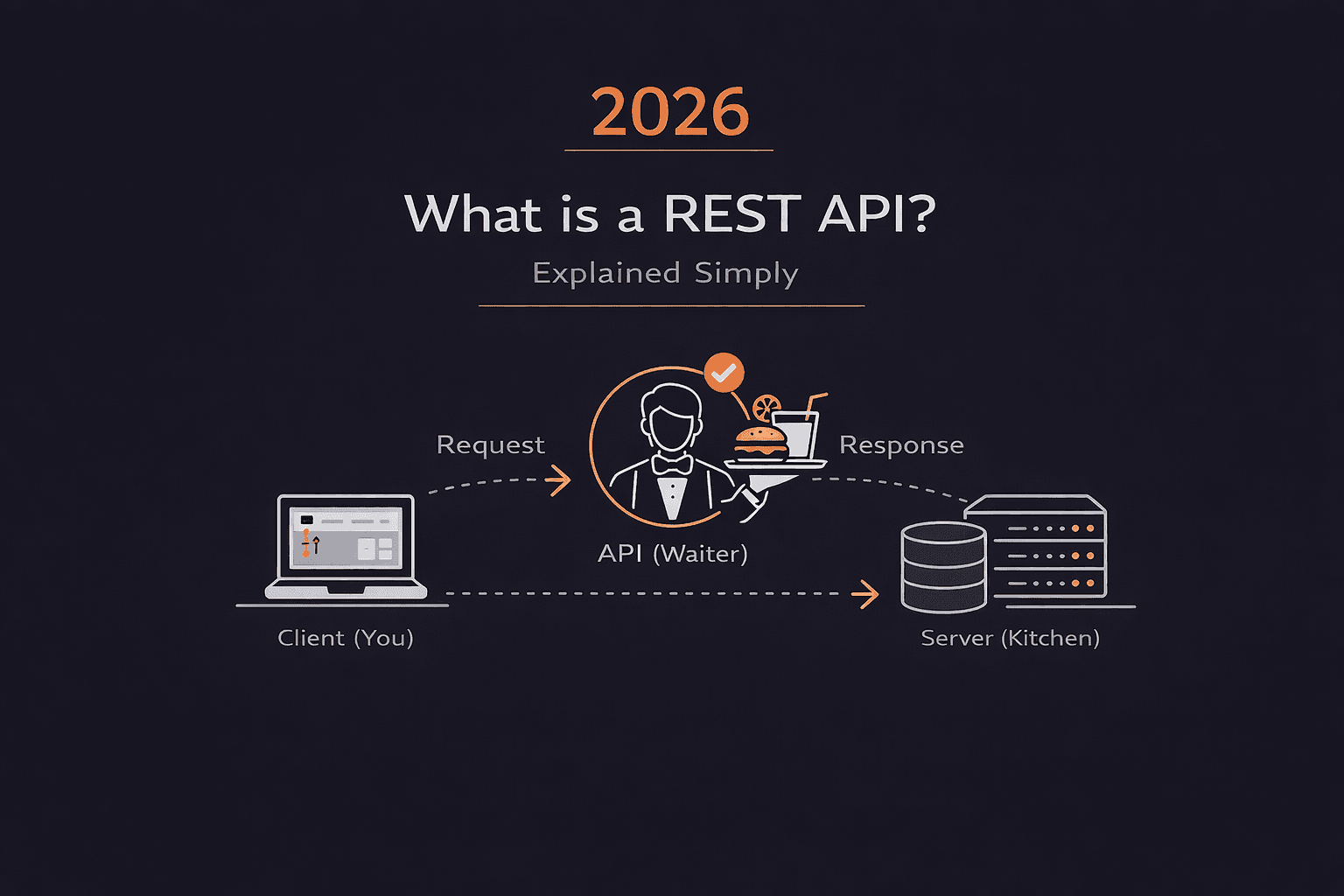
Short answer: A REST API is a way for two computers to talk to each other over the internet. Instead of clicking buttons on a website, you write code to request data from a server. Think of it like ordering food at a restaurant—you tell the waiter (API) what you want, and they bring it back from the kitchen (server).
Most APIs in the world work this way.
What exactly is a REST API?
API stands for Application Programming Interface.
That's a fancy way of saying: "A way for programs to talk to each other."
REST stands for Representational State Transfer.
That's an even fancier way of saying: "A set of rules for how those programs should talk."
Here's what that actually means:
When you visit a website like NASA's asteroid tracker, you click buttons and see pretty graphics.
But behind the scenes, that website is:
- Requesting data from a server
- Getting JSON data back
- Displaying it nicely for you
A REST API lets you skip the website and request that data directly with code.
Instead of clicking "Show me asteroids," you write:
javascript
fetch('https://api.nasa.gov/neo/rest/v1/feed')
  .then(response => response.json())
  .then(data => console.log(data))
And you get the raw asteroid data back.
That's what APIs do. They give you direct access to data and functionality.
The Restaurant Analogy (Makes Everything Clear)
Think of a REST API like a restaurant.
You (the client) sit at a table and want food.
The kitchen (the server) has all the food but you can't go back there.
The waiter (the API) is the middleman.
Here's how it works:
Step 1: You make a request
You tell the waiter: "I want a cheeseburger."
In code, this is an HTTP request:
javascript
GET /menu/cheeseburger
Step 2: The waiter takes your order to the kitchen
The waiter (API) goes to the kitchen (server) and tells the chef (database) what you want.
Step 3: The kitchen prepares your food
The chef makes your cheeseburger (processes your request, queries the database).
Step 4: The waiter brings it back
The waiter returns with your food (the server sends back a response with data).
json
{
  "item": "cheeseburger",
  "price": 8.99,
  "ready": true
}
You never talk directly to the kitchen. You always go through the waiter.
Same with APIs. Your code never talks directly to the database. It always goes through the API.
What makes an API "RESTful"?
REST is a set of rules (constraints) that APIs should follow.
These rules were established in the early 2000s and became the standard way to build APIs.
The main rules:
1. Resources have unique URLs (URIs)
Every piece of data (resource) gets its own address.
Examples:
https://api.example.com/users(all users)https://api.example.com/users/123(specific user)https://api.example.com/posts/456(specific post)
2. Use HTTP methods to show intent
Different actions use different HTTP verbs:
HTTP Methods Table:
| HTTP Method | What it does | Example |
|---|---|---|
| GET | Read data (retrieve) | GET /users/123 → Get user info |
| POST | Create new data | POST /users → Create new user |
| PUT | Update entire resource | PUT /users/123 → Replace user data |
| PATCH | Update part of resource | PATCH /users/123 → Update user email |
| DELETE | Remove data | DELETE /users/123 → Delete user |
Think of it like this:
- GET = "Show me"
- POST = "Create this"
- PUT = "Replace this"
- PATCH = "Update this"
- DELETE = "Remove this"
3. Stateless communication
Each request is independent.
The server doesn't remember previous requests.
Good:
Request 1: GET /users/123
Request 2: GET /posts/456
Each stands alone. The server doesn't need to remember Request 1 when handling Request 2.
Why this matters: Makes APIs predictable, reliable, and scalable.
4. Data is usually sent as JSON
JSON (JavaScript Object Notation) is the standard format for API data.
Example JSON response:
json
{
  "id": 123,
  "name": "Alice",
  "email": "alice@example.com",
  "active": true
}
Clean, human-readable, easy for code to parse.
How does a REST API request actually work?
Let's break down what happens when you make a request.
The Request Message
When you make a request, you send a request message to the server.
It has three parts:
1. Start line (method + URI)
GET /api/users/123 HTTP/1.1
This tells the server:
- GET = I want to read data
- /api/users/123 = This is the resource I want
- HTTP/1.1 = Version of HTTP protocol
2. Headers (metadata)
Accept: application/json
Authorization: Bearer abc123token
Content-Type: application/json
Headers tell the server:
- Accept = I want JSON data back
- Authorization = Here's proof I'm allowed to access this
- Content-Type = The data I'm sending is JSON
3. Body (optional, for POST/PUT/PATCH)
json
{
  "name": "Bob",
  "email": "bob@example.com"
}
The body contains data you're sending to create or update something.
GET and DELETE requests usually don't have a body.
The Response Message
The server sends back a response message.
It also has three parts:
1. Status line (status code)
HTTP/1.1 200 OK
Status codes tell you what happened:
200-level: Success
- 200 OK = Request worked
- 201 Created = New resource created
400-level: Client error (you messed up)
- 400 Bad Request = Your request was malformed
- 401 Unauthorized = You're not authenticated
- 404 Not Found = Resource doesn't exist
500-level: Server error (server messed up)
- 500 Internal Server Error = Server crashed
- 503 Service Unavailable = Server is down
2. Response headers
Content-Type: application/json
Server: Express
3. Response body (the data)
json
{
  "id": 123,
  "name": "Alice",
  "email": "alice@example.com"
}
This is the actual data you requested.
How to build your first REST API
Let's build a simple REST API from scratch using Node.js and Express.
You'll learn how to:
- Set up an Express server
- Create GET and POST endpoints
- Handle requests and send responses
Step 1: Set up your project
Create a new folder and initialize a Node.js project:
bash
mkdir my-first-api
cd my-first-api
npm init -y
This creates a package.json file.
Step 2: Install Express
bash
npm install express
Express is the most popular framework for building APIs in Node.js.
Step 3: Create your API file
Create index.js:
javascript
const express = require('express');
const app = express();
const PORT = 8080;

// Middleware to parse JSON
app.use(express.json());

// Start the server
app.listen(PORT, () => {
  console.log(`API running on http://localhost:${PORT}`);
});
What this does:
- Imports Express
- Creates an app instance
- Tells Express to parse JSON in request bodies
- Starts the server on port 8080
Step 4: Add a GET endpoint
Add this before app.listen():
javascript
// GET endpoint - Read data
app.get('/tshirt', (req, res) => {
  res.status(200).send({
    tshirt: '👕',
    size: 'large'
  });
});
What this does:
- Creates a GET endpoint at
/tshirt - When someone requests it, sends back JSON data
- Status 200 = Success
Step 5: Add a POST endpoint
javascript
// POST endpoint - Create data
app.post('/tshirt/:id', (req, res) => {
  const { id } = req.params;  // Get ID from URL
  const { logo } = req.body;  // Get logo from request body

  if (!logo) {
    return res.status(418).send({
      message: 'We need a logo!'
    });
  }

  res.status(200).send({
    tshirt: `👕 with ${logo}`,
    id: id
  });
});
What this does:
- Creates a POST endpoint at
/tshirt/:id :idis a dynamic parameter (can be any value)- Expects a
logoin the request body - Returns error if logo is missing
- Sends back the created t-shirt data
Step 6: Run your API
bash
node index.js
You should see: API running on http://localhost:8080
Step 7: Test your API
Test the GET endpoint:
Open your browser and go to: http://localhost:8080/tshirt
You should see:
json
{
  "tshirt": "👕",
  "size": "large"
}
Test the POST endpoint:
Use a tool like Insomnia, Postman, or curl:
bash
curl -X POST http://localhost:8080/tshirt/123 \
  -H "Content-Type: application/json" \
  -d '{"logo": "🔥"}'
You should get:
json
{
  "tshirt": "👕 with 🔥",
  "id": "123"
}
Congratulations! You just built a REST API from scratch.
Understanding Middleware
You might have noticed this line:
javascript
app.use(express.json());
This is middleware.
Middleware = Code that runs before your endpoint functions.
Think of it like security at a concert:
- You arrive (request comes in)
- Security checks your ticket (middleware processes request)
- You enter the venue (your endpoint function runs)
Without the express.json() middleware:
- Express can't parse JSON in request bodies
- Your POST endpoint wouldn't work
Common middleware:
- express.json() = Parse JSON bodies
- express.urlencoded() = Parse form data
- cors() = Allow cross-origin requests
- morgan() = Log requests
Tools for testing APIs
You can't just use a browser for all API testing.
Browser limitations:
- Only makes GET requests by default
- Hard to add headers or body data
Better tools:
1. Insomnia (Recommended for beginners)
- Visual interface
- Easy to set HTTP method, headers, body
- Saves request history
- Free
2. Postman
- Similar to Insomnia
- More features (team collaboration, documentation)
- Free for basic use
3. curl (Command line)
bash
# GET request
curl http://localhost:8080/tshirt

# POST request with JSON
curl -X POST http://localhost:8080/tshirt/123 \
  -H "Content-Type: application/json" \
  -d '{"logo": "🚀"}'
Pick one and learn it. You'll use it constantly.
Real-world API examples
Here are APIs you might actually use:
1. Weather API (OpenWeatherMap)
javascript
fetch('https://api.openweathermap.org/data/2.5/weather?q=London&appid=YOUR_KEY')
  .then(res => res.json())
  .then(data => console.log(data));
Gets current weather for a city.
2. GitHub API
javascript
fetch('https://api.github.com/users/octocat')
  .then(res => res.json())
  .then(data => console.log(data));
Gets info about a GitHub user.
3. NASA API
javascript
fetch('https://api.nasa.gov/planetary/apod?api_key=DEMO_KEY')
  .then(res => res.json())
  .then(data => console.log(data));
Gets NASA's astronomy picture of the day.
All of these work the same way:
- Make a GET request to a URL
- Get JSON data back
- Use that data in your app
Our Take at Art of Code
REST APIs are fundamental to modern web development.
You'll use them constantly:
- Frontend apps fetching data
- Mobile apps talking to servers
- Microservices communicating
- Third-party integrations
Learn this well. It's not optional.
Our recommended learning path:
- Understand what REST APIs are (this article)
- Build 2-3 simple APIs from scratch
- Use public APIs in your projects
- Learn authentication (JWT, OAuth)
- Deploy an API to production
Want to build API-powered projects while learning?
Use it to:
- Build full-stack apps quickly
- Test API integrations
- Ship products that use APIs
- Learn by building real projects
Then understand how the APIs work under the hood.
5 FAQs
Q: What's the difference between REST API and API?
A: API is the general term for any interface between programs. REST API specifically means an API that follows REST architectural principles (uses HTTP methods, stateless, resource-based URLs). Other API types include GraphQL, SOAP, and gRPC.
Q: Do I need to know REST APIs to be a developer?
A: Yes. Almost every modern application uses REST APIs. Frontend developers use them to fetch data. Backend developers build them. Mobile developers consume them. You can't avoid APIs in professional development.
Q: What's the difference between GET and POST?
A: GET retrieves data (read-only, no body). POST creates new data (includes body with data to create). GET is safe (doesn't change anything). POST modifies server state. GET can be cached, POST cannot.
Q: Why do we use JSON instead of XML?
A: JSON is simpler, more readable, and native to JavaScript. XML is verbose and harder to parse. JSON became the standard because it's lightweight and works perfectly with modern web applications. Most new APIs use JSON exclusively.
Q: How do I secure a REST API?
A: Common methods: API keys (simple but limited), JWT tokens (stateless authentication), OAuth 2.0 (delegated authorization), HTTPS (encrypt traffic), rate limiting (prevent abuse), input validation (prevent attacks). Start with HTTPS and API keys, then learn JWT for production apps.
The Bottom Line
REST APIs are how programs talk to each other over the internet.
Key concepts:
- Resources have unique URLs
- HTTP methods show intent (GET, POST, etc.)
- Requests and responses have specific formats
- Status codes tell you what happened
- Data is usually JSON
To build a REST API:
- Set up Express
- Define endpoints with HTTP methods
- Handle requests, send responses
- Test with Insomnia or Postman
This is fundamental knowledge.
Every developer needs to understand REST APIs.
Build one this week. Even a simple one. Get comfortable with the concepts.
Then use public APIs in your projects.
You'll use this knowledge every single day as a developer.
What part of REST APIs confuses you? Drop a comment.
We read them all and use them to create better tutorials.
Written by Curious Adithya for Art of Code