Program Derived Addresses (PDAs) in Solana — Beginner Friendly Guide
### <span style="color: lab(27.1134 -0.956401 -12.3224);">“Program Derived Addresses (PDAs) are 32-byte addresses derived from seeds and a program ID. They do n...
“Program Derived Addresses (PDAs) are 32-byte addresses derived from seeds and a program ID. They do not have a private key and can only be signed by the program.”
ref: Docs
What are PDAs?
A Program Derived Address (PDA) is a special type of account in Solana that is:
- Deterministically generated
- Controlled by a program (not a private key)
- Used for storing program-owned data
Key Idea
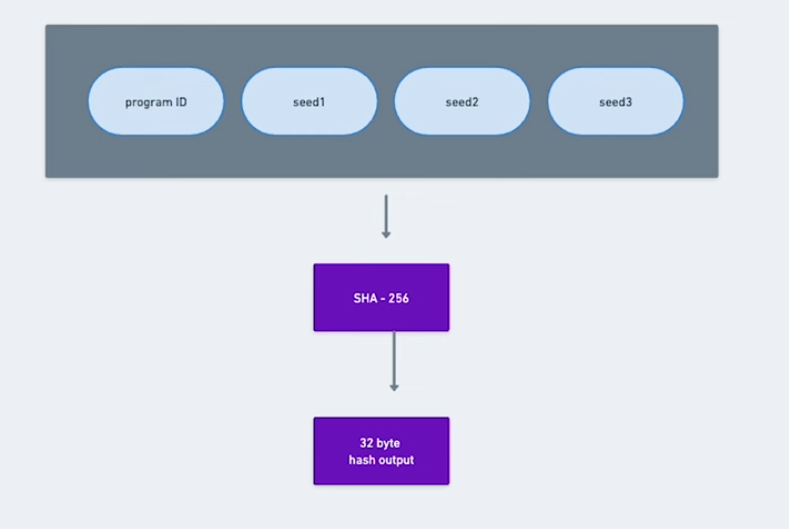
A PDA is created using:
PDAs = hash(user's seed + programid + bump)
Here we can see something like ‘bumps’, what is bumps? what’s its role here. for now just think it as an additional check solana devs added to make PDAs not clash with private key.
Where:
- seeds → user-defined inputs
- programId → the program generating the PDA
- bump → ensures the address is valid (more on this below)
 ### Why PDAs are Special
Unlike normal accounts:
- ❌ No private key exists
- ❌ Cannot be signed by a user
- ✅ Only the program can “sign” using
invoke_signed
👉 This makes PDAs perfect for:
- Vaults
- Escrow accounts
- Program-controlled state
⚠️ Important Detail: PDAs are NOT auto-created
Deriving a PDA:
- ✅ Gives you an address
- ❌ Does NOT create the account
👉 You must explicitly create the account in your program.
What is a Bump?
When generating a PDA, we must ensure:
The address does NOT lie on the Ed25519 curve
Why?
Because if it did, it could have a private key — which breaks the whole idea of PDAs.
🧩 How Bump Works
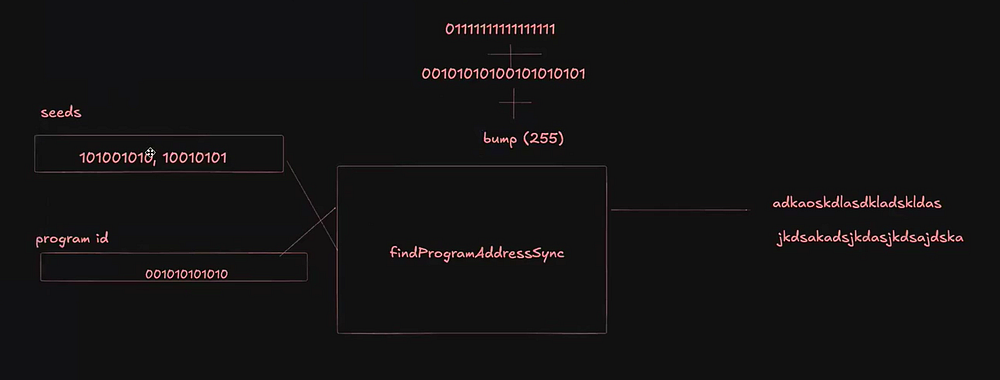
- Solana tries values from 255 → 0
- It keeps adding the bump to seeds
- Stops when it finds a valid (off-curve) address
👉 That value is called the canonical bump
📌 Simple Explanation
Think of bump as:
“A number added to make sure the PDA is safe and has no private key.”
PDAs Key Points
Now let’s discuss some advantages of PDAs.
- PDAs are addresses derived deterministically using a combination of user-defined seeds, a bump seed and a program’s ID.
- PDAs are addresses that fall off the Ed25519 curve and have no corresponding private key.
- Solana program can sign on behalf of PDAs that are derived using its programID.
- Deriving a PDA does not automatically create an on-chain account.
- An account using a PDA as its address must be explicitly created through a dedicated instruction within a Solana Program.
 ### ⚙️ PDA Generation Functions
Solana provides two main functions:
What is findProgramaddress?
Here we are learning about PDAs, then what’s the role of these two functions here well, We just saw the concept of bumps. What are they? How do they work right? Now in solana code base user gets 2 option for generating the PDA addresses. Let’s see how these functions help us.
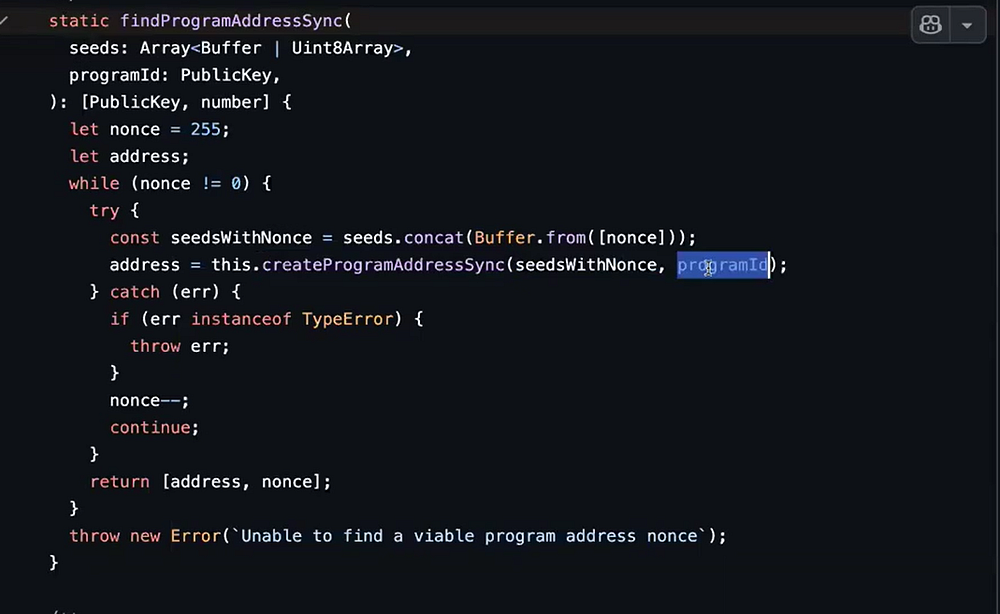
findProgramaddressSync: “Find a valid program address. Valid program addresses must fall off the ed25519 curve. This function iterates a nonce until it finds one that when combined with the seeds results in a valid program address.”
Parameters:
- seeds: (Uint8Array | Buffer)[]
- programId: PublicKey
- Returns [PublicKey, number]
- Defined in src/publickey.ts:212
StaticisOnCurve
- isOnCurve(pubkeyData: PublicKeyInitData): boolean
- Check that a pubkey is on the ed25519 curve.
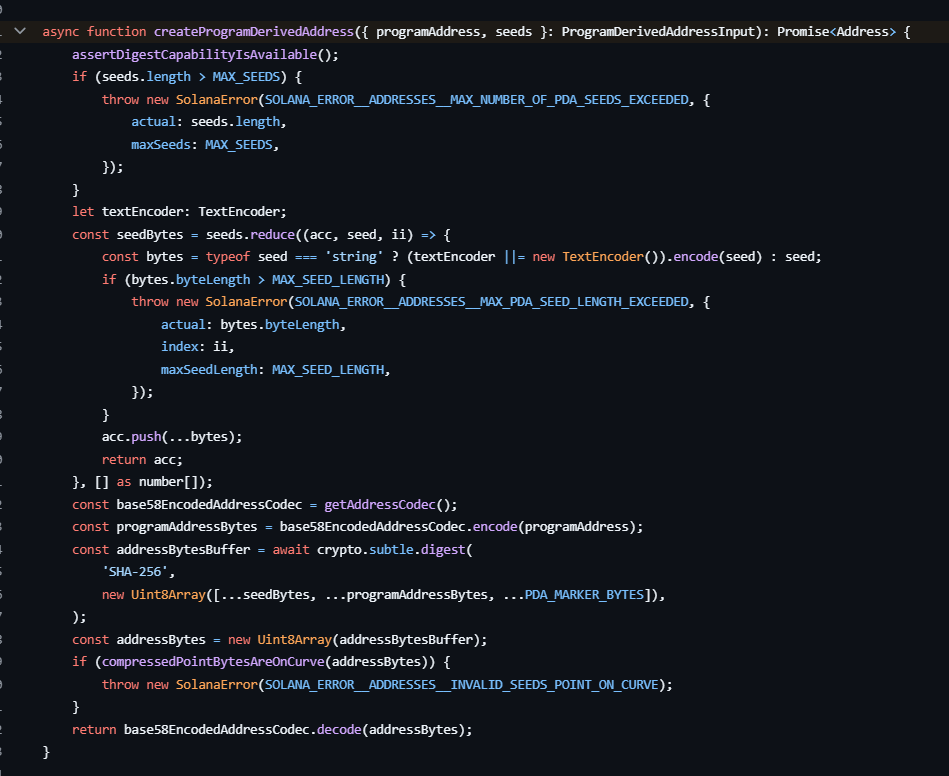
 What is
 createProgramDerivedAddress?
“A low-level Solana function that deterministically generates a Program Derived Address (PDA) from given seeds and a program ID, requiring the caller to include the correct bump seed, and throwing an error if the resulting address is on-curve (invalid for PDAs).”
 ref: https://github.com/anza-xyz/kit/blob/v2.1.0/packages/addresses/src/program-derived-address.ts#L101
basically findProgramaddress works for you it adds up the bump for you and gives you a valid PDA. It hides the work under the hood hit and try all the bytes 255–0 and split out a valid one. remove the hustle from your side.
But in the createProgramDerivedAddress works the same but there is big catch, the bump is missing here. Here dev have to add the bump himslef to get a 100% valid PDA, the problem is now the developer needs to know the real point between 255–0 where the right PDA lies. very time consuming, very much hard to do. You need to hit and try evey single byte 255–0.
That’s the key different between the both of these functions. Most of the places you’ll see the findProgramaddress in use.
✍️ Final Thoughts
PDAs are one of the most powerful concepts in Solana.
Once you understand them, you unlock:
- Secure state management
- Advanced program logic
- Real-world use cases like escrow and vaults
✨ Thanks for reading! If you would like more Solana tech blogs, subscribe to me here for weekly insights.
👋 About Me
I’m Abhishek (mscode07) — developer & indie hacker.
I write about Web3, building, and learning in public.
📥 Feedback
I’m still improving my writing —
so feel free to share honest feedback (good or bad).